The Gen II Power Watchdog is a genuinely well-specified Electrical Management System with one distinguishing idea — a surge module you replace instead of the whole unit — and one distinguishing feature, WiFi monitoring that works from outside Bluetooth range.
Whether it is worth its price depends entirely on whether you will open the app. The protection it offers is not meaningfully better than a Progressive EMS-PT30X costing a fraction as much. What it offers is information.
Who it is for
A good fit if you leave the rig unattended with loads running and want to know when campground voltage sags; if you camp regularly at parks with known poor supply; or if you simply value seeing live voltage and amperage without walking to the pedestal.
A poor fit if you want protection and nothing else. The Progressive EMS-PT30X disconnects on the same fault categories, publishes its thresholds in more detail, and costs substantially less. Buying the Power Watchdog for protection alone is paying for radios you will not switch on.
The specification
| Surge protection | 3,000 joules |
| Service | 30 amp, 120V |
| Protection type | Full EMS — high/low voltage, open ground, open neutral, overcurrent |
| Emergency power off | Yes, cuts supply the moment a fault is detected |
| Surge module | Replaceable cartridge |
| Connectivity | WiFi and Bluetooth |
| Weather rating | IP65 |
| Warranty | Limited lifetime, original purchaser only |
The 50 amp version is the PWD50EPOW, and a hardwired Gen II variant (PWD30EPOHW) is available if you would rather it lived inside the rig.
Design and build
The physical design has had genuine thought applied. The connection bay is a lockable, lit clamshell — the lock matters because a portable unit at a pedestal is a few hundred dollars sitting unattended overnight, and the light matters at the exact moment you are connecting in the dark.
IP65 is an explicit published rating, which is more than most competitors offer. Progressive publishes an operating temperature range but no IP figure.
The trade-off owners report is bulk: it is a substantial object, and in some pedestal boxes it is an awkward fit.
The warranty clause worth knowing about
Hughes’ own FAQ states the limited lifetime warranty covers the original purchaser only, and does not transfer between owners.
That is not unusual as a policy, but it is rarely mentioned in reviews, and it matters more here than it would elsewhere — the lifetime warranty is one of the main reasons to buy this brand at this price. Buy one second-hand and you are paying a premium for a feature set while losing the cover that helps justify it.
The WiFi requirement behind most complaints
Gen II WiFi units are, per Hughes, only compatible with a 2.4 GHz SSID.
This single line explains a large share of the “won’t connect” reports. Modern routers frequently broadcast a combined network that steers devices onto 5 GHz, and many people have no separate 2.4 GHz SSID to offer. The unit is not faulty; it cannot see a network it can use.
If you plan to rely on WiFi monitoring, check you can present a 2.4 GHz SSID — from your home router, an RV WiFi extender, or a phone hotspot configured appropriately — before buying.
There is a second trap in the same area. Hughes runs three separate apps: the original “Power WatchDog” for early models, “Power WatchDog EPO” for early EPO models, and “Power WatchDog Gen2 (WiFi)” for Gen II units. They are distinguished by logo color. Installing the wrong one produces a unit that appears not to work.
What owners report
Reported by owners, not observed by us. Recurring themes across iRV2, Jayco Owners and Montana Owners forum discussion, August 2026.
What owners consistently praise
- It has caught real pedestal faults The most common positive theme is owners reporting the unit refused a bad post or cut power during a sag — the thing it exists to do.
- The monitoring gets used Owners who wanted the app generally report using it, particularly for watching voltage on hot afternoons.
- Replaceable module is valued Reported as a genuine differentiator rather than a marketing line, though few owners have needed it.
What comes up repeatedly as a complaint
- WiFi dropouts Connection loss sometimes requiring a power cycle is the single most common complaint.
- App confusion between generations Multiple apps, and newer apps not working with older units, comes up repeatedly.
- Nuisance shutoffs Some owners find it more sensitive than they would like and report it cutting power where they judged it unnecessary.
- Bulk and a bright face light Awkward fit in some pedestal boxes, and the illuminated face is brighter than some want overnight.
On the nuisance shutoff complaint, a note in the unit’s defence: an EMS disconnecting is usually correct behaviour rather than oversensitivity. Supply that dips briefly below threshold is genuinely out of range, and the device has no way to know you would have tolerated it. That said, the complaint recurs often enough to be worth weighing if you camp somewhere with marginal supply and would rather have power than protection.
The surge module in practice
The module is the unit’s distinguishing design decision, so how you know it needs changing matters.
Per Hughes: the WatchDog logo turns red and an E9 code appears in the LCD window. On Gen I base models (PWD30/PWD50) the indication is different — one or both of the lights below the main three go out.
Published module prices vary by retailer and by amperage, and we could not confirm a single figure from Hughes. What is consistent is that a module costs a small fraction of a replacement unit, which is the entire point.
Alternatives worth considering
The unit reviewed here
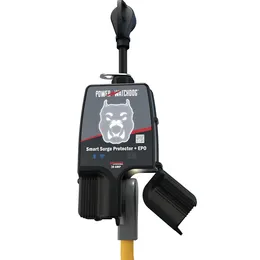
Power Watchdog Gen II (30A)
Gen II, 30 amp, WiFi and Bluetooth, emergency power off, replaceable surge module.
The cheaper alternative
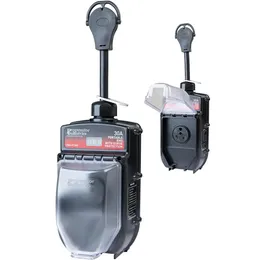
Progressive EMS-PT30X
Same protection categories and a lifetime warranty, without the radios or the premium.
The 50 amp version
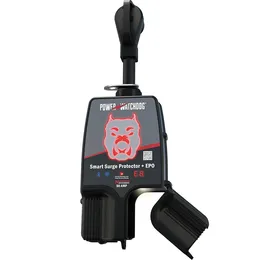
Power Watchdog Gen II (50A)
Identical reasoning, more surge headroom, for 50 amp service.
Progressive EMS-PT30X is the direct competitor and the one most people should compare against. Same fault categories, more published detail about thresholds and timings, lifetime warranty, considerably cheaper — and no app. We put them head to head in Progressive vs Power Watchdog, and examine it on its own in the EMS-PT30X review. Note that its warranty carries an authorised-dealer condition that Hughes does not state.
Surge Guard 34930 takes a third position: an LCD on the unit itself showing live voltage and amp draw, so you get the readout without a phone, plus a warranty that includes connected-equipment cover.
The verdict
A strong product with two clauses buried in the documentation that deserve to be on the box: the warranty does not transfer, and the WiFi needs 2.4 GHz.
Neither is a reason not to buy it. Both are reasons to buy it knowingly.
If remote monitoring is something you will genuinely use — and be honest, most people who buy monitoring features stop opening the app by week three — this is a well-built unit with a sensible repair story and a lifetime warranty. If you just want your rig protected, the Progressive does that for a great deal less money.
Related guides
- Progressive vs Power Watchdog — the direct comparison, with a verdict.
- Best RV surge protectors — eight units across both amperages.
- RV surge protector error codes — including why E9 means different things on different brands.
- EMS vs surge protector — the question worth settling before choosing any model.
Questions worth answering
Is the Hughes Power Watchdog worth the money?
If you will use the monitoring, yes. If you will not, you are paying a large premium over the Progressive EMS-PT30X for protection against the same categories of fault. The unit is well specified — the question is whether its distinguishing features are ones you will actually use.
What does an E9 code mean on a Power Watchdog?
The surge module needs replacing. Hughes states that the WatchDog logo turns red and an E9 code appears in the LCD window. Note this is brand-specific — on a Progressive unit E-9 means a data link fault and E-10 is the module code.
Why will my Power Watchdog not connect to WiFi?
Most likely the network band. Hughes states Gen II WiFi units are only compatible with a 2.4 GHz SSID. A 5 GHz network, or a combined network that steers devices to 5 GHz, will not work.
Does the warranty transfer if I buy one used?
No. Hughes states the limited lifetime warranty applies to the original purchaser only and does not transfer. That materially changes the value of a second-hand unit, since the warranty is one of the main reasons to buy this brand.
Which app do I need?
Hughes runs three separate apps. Gen II WiFi units use "Power WatchDog Gen2 (WiFi)" with the blue and white logo. Earlier units use the original red/white app or the black/red EPO app. Downloading the wrong one is a common cause of a unit that appears not to work.
How often does the surge module need replacing?
Only after the unit has absorbed enough surge energy to spend it, which for most owners is not an annual event. The point of the design is that when it does happen you replace a cartridge rather than the whole unit.